 login
login

3-Wire Serial LCD using a Shift Register
- Rajendra Bhatt
- rajbex@yahoo.com
- 84.963 Views
- moderate
- Tested
- 1 Likes


Introduction
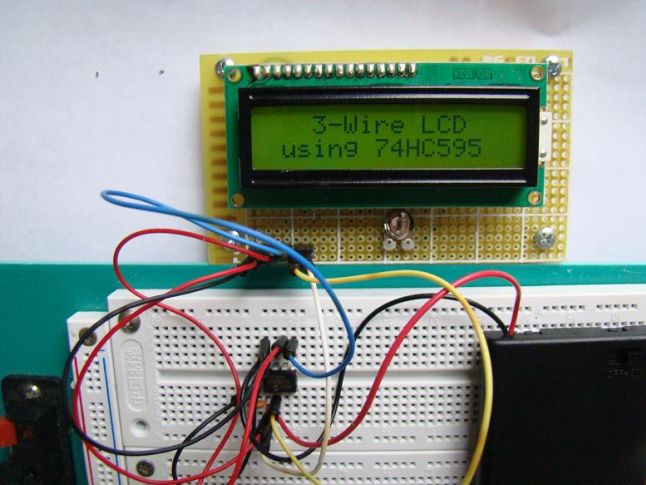
HD44780 based character LCDs require at least 6 I/O lines from microcontroller to display data. Therefore, they are not suitable for low-pin microcontrollers like PIC12F series microchips. In this project, I am going to show how to drive an HD44780 based LCD display with only 3 pins of a microcontroller. I am going to demonstrate it with PIC12F683 microchip. The character data and command from the microcontroller is transferred serially to a shift register (74HC595), and the parallel output from the shift register is fed to LCD pins.
About 74HC595
74HC595 is a high-speed 8-bit serial in, serial or parallel-out shift register with a storage register and 3-state outputs.
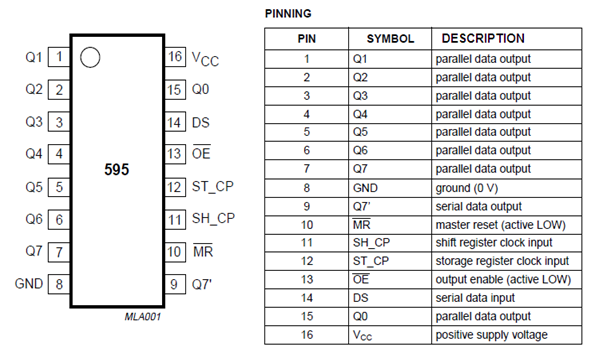
The shift register and storage registers have separate clocks, SH_CP and ST_CP respectively. Data in the shift register is shifted on the positive-going transitions of SH_CP, and the content of shift register will be transferred to the storage register on a positive-going transition of the ST_CP. If we tie both the clocks together, the shift register will always be one clock ahead of the storage register. The 8-bit data of the storage register will appear at the parallel output (Q0-Q7) when the output enable (OE) is low.
In this project, SH_CP and ST_CP are tied together. So, if we want to receive a serially transferred 8-bit into parallel form at Q0-Q7, an extra clock pulse is required after transmitting the 8-th bit of serial data because the clocks are tied and the storage register is 1-clock behind the shift register.
HD44780-based character LCD
All HD44780 based character LCD displays are connected using 14 wires: 8 data lines (D0-D7), 3 control lines (RS, E, R/W), and three power lines (Vdd, Vss, Vee). Some LCDs may have LED backlight and so they may have additional connections (usually two: LED+ and LED-).
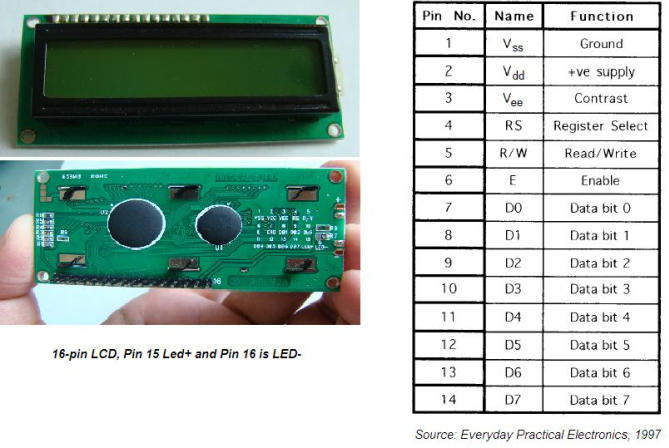
Providing detail explanation of individual LCD pin doesn’t fall within the scope of this project. If you are a beginner with LCD, I recommend to read these two articles first from Everyday Practical Electronics magazine : How to use intelligent LCDs
- Part 1: http://lcd-linux.sourceforge.net/pdfdocs/lcd1.pdf
- Part 2. http://lcd-linux.sourceforge.net/pdfdocs/lcd2.pdf
Circuit Diagram
The hardware part of this project is fairly simple. The challenging part is to write the driver software that is responsible for a proper sequence of operations required to serially transfer character data and command to 74HC595 serial-in parallel-out shift register. The shift register parallel output is then connected to LCD data lines (D4-D7) and RS control pin. This arrangement requires 3-pins of microcontroller to display character data on a parallel LCD display: 2 pins for providing Clock and Data to 74HC595, and 1 pin for enable control (E) pin of LCD module. Since the data transfer uses 4-bit mode, any 8-bit command or character data is sent in two steps: send the higher nibble first, and then the lower nibble. The R/W control pin is grounded, and therefore no data or status read from the LCD module is possible in this case.
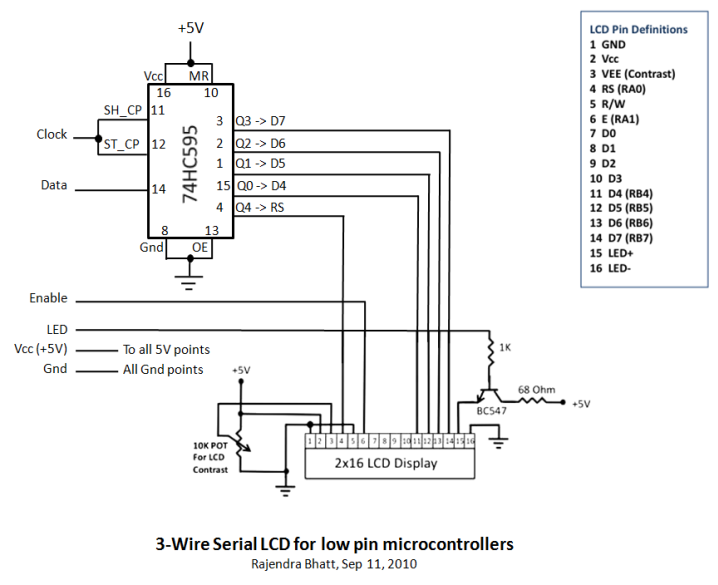
The SH_CP (11) and ST_CP (12) clock inputs of 75HC595 are tied together, and will be driven by one microcontroller pin. Serial data from microcontroller is fed to the shift register through DS (14) pin. OE (13) pin is grounded and reset pin MR (10) is pulled high. Parallel outputs Q0-Q3 from 74HC595 are connected to D4-D7 pins of the LCD module. Similarly, Q4 output serves for RS control pin. If the LCD module comes with a built-in backlight LED, it can simply be turned ON or OFF through LED control pin shown above. Pulling the LED pin to logic high will turn the back light ON.
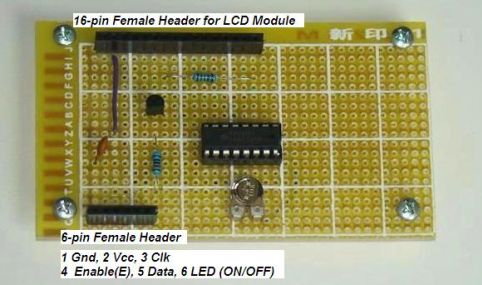
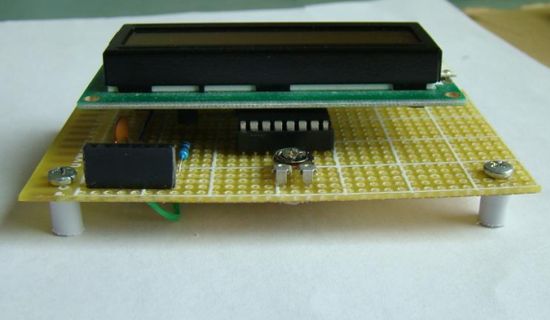
Circuit soldered on a general purpose prototyping board
Software
A first, a bit of data fed to DS pin of 74HC595 appears at Q0 output after 2 clocks (because SH_CP and ST_CP are tied). So, sending 4-bit data (D4-D7) and an RS signal require 6 clock pulses till they appear at Q0-Q4 outputs respectively. When the LCD module is turned ON, it is initialized in 8-bit mode. A number of initializing commands should be sent to operate the LCD module in 4-bit mode. All the driver routines that are discussed here are written in mikroC compiler. They work only for a 16×2 LCD module. User can modify the initialization operations inside the Initialize_LCD() routine to account for other LCD configurations. The driver routines and their functions are described below.
- Initialize_LCD() : It initializes the LCD module to operate into 4-bit mode, 2 lines display, 5×7 size character, display ON, and no cursor.
- Write_LCD_Data() : Sends a character byte to display at current cursor position.
- Write_LCD_Cmd() : Write a command byte to the LCD module.
- Write_LCD_Nibble() : Data or command byte is sent to the LCD module as two nibbles. So this function routine takes care for sending the nibble data to the LCD module.
- Write_LCD_Text() : This routine is for sending a character string to display at current cursor position.
- Position_LCD() : To change the current cursor position
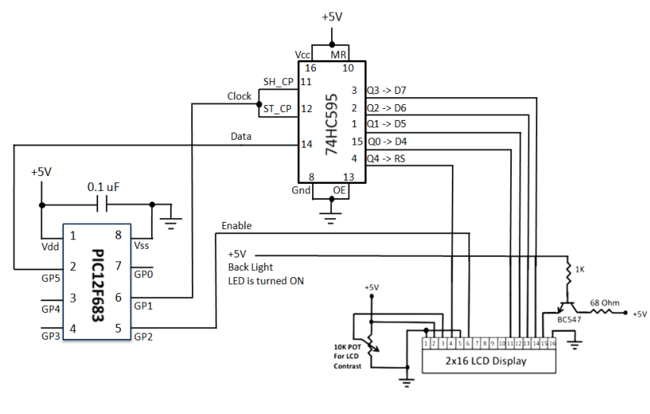
At the beginning of your program, you need to define Data_Pin, Clk_Pin, and Enable_Pin to the chosen microcontroller ports. I am going to demonstrate here how to use these driver routines to display two blinking character strings, Message1 and Message2, at different locations. I am going to test our serial LCD module with PIC12F683 microcontroller. The test circuit is shown below.
Note: My PIC12F683 Settings
Running at 4 MHz internal clock, MCLR disabled, WDT OFF.
lock, Data, and Enable lines are served through GP1, GP5, and GP2 ports.
Code
/* 3-wire Serial LCD using 74HC595
Rajendra Bhatt, Sep 6, 2010
*/

sbit Data_Pin at GP5_bit;
sbit Clk_Pin at GP1_bit;
sbit Enable_Pin at GP2_bit;

// Always mention this definition statement
unsigned short Low_Nibble, High_Nibble, p, q,  Mask, N,t, RS, Flag, temp;

void Delay_50ms(){
 Delay_ms(50);
}

void Write_LCD_Nibble(unsigned short N){
 Enable_Pin = 1;
 // ****** Write RS *********
 Clk_Pin = 0;
 Data_Pin = RS;
 Clk_Pin = 1;
 Clk_Pin = 0;
 // ****** End RS Write

 // Shift in 4 bits
 Mask = 8;
  for (t=0; t<4; t++){
   Flag = N & Mask;
   if(Flag==0) Data_Pin = 0;
   else Data_Pin = 1;
   Clk_Pin = 1;
   Clk_Pin = 0;
   Mask = Mask >> 1;
  }
  // One more clock because SC and ST clks are tied
  Clk_Pin = 1;
  Clk_Pin = 0;
  Data_Pin = 0;
  Enable_Pin = 0;
  Enable_Pin = 1;
}
// ******* Write Nibble Ends

 void Write_LCD_Data(unsigned short D){
 RS = 1; // It is Data, not command
 Low_Nibble = D & 15;
 High_Nibble = D/16;
 Write_LCD_Nibble(High_Nibble);
 Write_LCD_Nibble(Low_Nibble);
 }

void Write_LCD_Cmd(unsigned short C){
 RS = 0; // It is command, not data
 Low_Nibble = C & 15;
 High_Nibble = C/16;
 Write_LCD_Nibble(High_Nibble);
 Write_LCD_Nibble(Low_Nibble);
}

void Initialize_LCD(){
 Delay_50ms();
 Write_LCD_Cmd(0x20); // Wake-Up Sequence
 Delay_50ms();
 Write_LCD_Cmd(0x20);
 Delay_50ms();
 Write_LCD_Cmd(0x20);
 Delay_50ms();
 Write_LCD_Cmd(0x28); // 4-bits, 2 lines, 5x7 font
 Delay_50ms();
 Write_LCD_Cmd(0x0C); // Display ON, No cursors
 Delay_50ms();
 Write_LCD_Cmd(0x06); // Entry mode- Auto-increment, No Display shifting
 Delay_50ms();
 Write_LCD_Cmd(0x01);
 Delay_50ms();
}

void Position_LCD(unsigned short x, unsigned short y){
 temp = 127 + y;
 if (x == 2) temp = temp + 64;
 Write_LCD_Cmd(temp);
}

void Write_LCD_Text(char *StrData){
 q = strlen(StrData);
 for (p = 0; p<q; p++){<br="">  temp = StrData[p];
  Write_LCD_Data(temp);
 }

}

char Message1[] = "3-Wire LCD";
char Message2[] = "using 74HC595";

void main() {
CMCON0 = 7;  // Disable Comparators
TRISIO = 0b00001000;  // All Outputs except GP3
ANSEL = 0x00; // No analog i/p

Initialize_LCD();

do {
 Position_LCD(1,4);
 Write_LCD_Text(Message1);
 Position_LCD(2,2);
 Write_LCD_Text(Message2);
 Delay_ms(1500);
 Write_LCD_Cmd(0x01);  // Clear LCD
 delay_ms(1000);
} while(1);

}
Test Circuit and Output
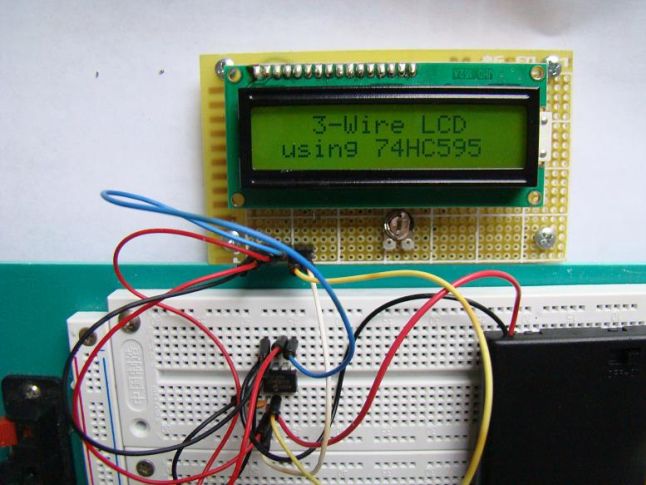
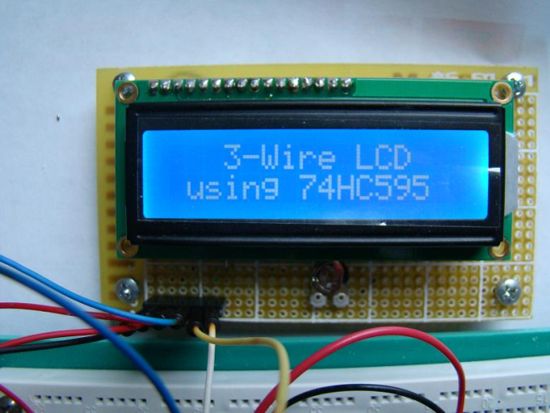
Testing with a different LCD module
Please follow and like us:








hi, please help me in bascom code ineed to clculate gear frequency and get event sensor hall effect interface to shift register and atmega16
hi, please help me in bascom code ineed to clculate gear frequency and get event sensor hall effect interface to shift register and atmega16
Very shortly this website will be famous among all blogging viewers, due to it’s pleasant content
Thanks for your kind words and for your visit. We try our best to bring good content and your comments encourage us to continue.
Using two shift-registers it’s also possible to use 8-bit mode 😉
Plus the remaining 7 bit in the second register make – together with a couple of 4066s and resistors – for a nice software-controllable brightness- and contrast-adjustment.
code does not work…..tried it in mikroC, it did not compile.
Code does not work. It compiles alright, but the lcd is not showing anything.
Please make sure every connection is correct and that the LCD brightness potentiometer is set correctly (not to bright). More information on the issue will help us give a better answer.
What is temp = StrData[p]; in plain C/C== means? I’ve figured out all other magic style of this what looks like C, but not this line. I’m using AVR chip and Atmel Studio. Thanks!
Can it work with high speed dspic ?